
Table of Contents
- What Does a Photometric Chart Actually Show?
- Understand the Units Before Comparing the Curves
- How to Read a Photometric Chart Step by Step
- How to Convert Candela Into Illuminance
- A Practical Example: Why Higher Center Intensity Can Leave a Darker Gap
- Read the Curve Beyond Its Brightest Point
- Use Isolux Lines to Check Coverage and Overlap
- What to Check Before Finalizing the Layout
- FAQs
To read a photometric chart, first identify what the diagram measures, check its units and orientation, and follow the relevant angle to the light distribution curve. The value you read usually describes luminous intensity in that direction. To determine how much light reaches a path, wall, or planting bed, you must also account for distance and the angle at which the light strikes the surface.
That last step makes the chart useful.
A fixture can produce an impressive bright spot directly underneath it while leaving the space between fixtures poorly illuminated. Understanding a photometric chart helps you spot that problem before choosing a mounting height or finalizing a lighting layout.
What Does a Photometric Chart Actually Show?
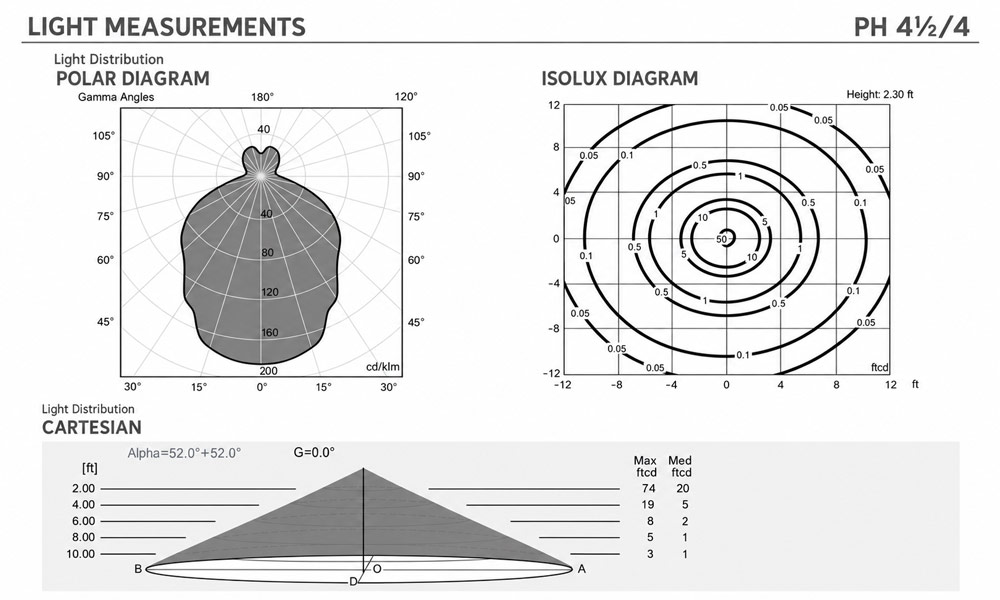
This LED light distribution diagram illustrates the polar intensity curve, isolux contours, and Cartesian distribution to help visualize light intensity, beam angle, and illuminance across different distances.
“Photometric chart” describes several diagrams used to explain lighting performance. Before interpreting the numbers, identify the type of chart you are looking at.
| Chart type | What it shows | What it helps you evaluate |
|---|---|---|
| Polar intensity diagram | Light intensity in different directions around a fixture | Beam shape, directional emphasis, and symmetry |
| Cartesian intensity graph | Intensity plotted against angle on rectangular axes | Beam width and changes in intensity across a beam |
| Illuminance cone diagram | Beam dimensions and specified illuminance at different distances | Approximate coverage and output at a particular distance |
| Isolux diagram | Lines connecting points with equal illuminance on a defined surface | Coverage, overlap, and illumination near boundaries |
The key distinction is between light leaving a fixture and light arriving at a surface. An intensity diagram describes the first. An illuminance diagram describes the second under stated installation conditions.
A polar diagram is therefore a useful starting point, but its outline is not a drawing of the illuminated area on the ground.
Understand the Units Before Comparing the Curves
A fixture’s lumen output tells you how much visible light it emits in total. A photometric chart adds information about where that light goes.
| Unit | What it measures | Practical meaning |
|---|---|---|
| Lumens, lm | Total luminous flux | How much light the source emits |
| Candela, cd | Luminous intensity in a particular direction | How strongly light is directed toward a point |
| Lux, lx | Illuminance on a surface | How much light reaches each square meter |
| Foot-candles, fc | Illuminance on a surface | How much light reaches each square foot |
One foot-candle equals approximately 10.764 lux.
Two fixtures with equal lumen output can have very different candela distributions. One may concentrate its output into a narrow beam, while the other spreads it across a wider area. Their usefulness depends on the surface you want to illuminate.
How to Read a Photometric Chart Step by Step
1. Match the Chart to the Exact Fixture Configuration
Start with the information around the diagram.
Check the model, optical distribution, output setting, and any accessories included in the test. A clear lens, diffuser, reflector, or shielding accessory can change the distribution.
Pay particular attention to whether the report covers a complete fixture or a separate light source. A lamp’s photometric data does not automatically describe its performance after installation inside a housing.
The chart should represent the configuration you intend to install.
2. Establish Which Direction the Angles Represent
On a common Type C polar diagram for a downward-facing fixture:
- 0° points straight down.
- 90° points horizontally.
- 180° points straight up.
Always confirm the diagram’s coordinate system and orientation. An adjustable spotlight may be shown in a reference position that differs from its installed aiming direction.
The page itself can also be misleading. A curve drawn toward the bottom of the page does not establish where an installed fixture will send its light after the fixture is tilted.
3. Identify the Different Measurement Planes
A polar chart often includes curves labeled C0–C180 and C90–C270.
These represent two perpendicular sections through the light distribution. Read the legend to determine how those sections relate to the fixture’s front, side, or longitudinal axis.
Overlapping curves indicate similar distributions in the displayed planes. They do not, by themselves, prove that the fixture distributes light identically in every direction.
When the curves differ substantially, orientation matters. Rotating the fixture may send its wider distribution across a walkway instead of along it.
4. Check Whether the Scale Uses cd or cd/klm
This small label can change the meaning of every number on the chart.
A scale marked cd gives luminous intensity directly.
A scale marked cd/klm, or cd/1,000 lm, gives intensity normalized to a reference luminous flux. You must apply the stated lumen basis to obtain actual candela.
For example, suppose a chart is normalized to 1,000 luminaire lumens:
- The curve reads 300 cd/klm at a particular angle.
- The fixture produces 600 lumens.
- Actual intensity at that angle is 300 × 600 ÷ 1,000 = 180 cd.
Check whether the report’s reference is lamp lumens or luminaire lumens. Those values are not interchangeable.
Also compare the numerical scales of different charts. A curve that occupies more of its diagram may simply have been plotted against a smaller maximum value.
5. Follow an Angle to the Curve
Suppose you want the intensity at 30°.
Find the 30° radial line, follow it outward until it intersects the relevant curve, and read the intensity using the concentric scale. Estimate between labeled rings when necessary.
The rings represent intensity values. They do not represent meters, feet, or beam travel distance.
If the curve intersects halfway between the 200 cd and 300 cd rings, the approximate intensity is 250 cd in that direction. For precise calculations, use the accompanying numerical intensity table when available.
6. Read the Beam Boundary Carefully
Under the common 50%-of-maximum convention, beam angle is the full angle between the two directions where intensity falls to half its maximum. Field angle commonly uses the wider 10%-of-maximum boundary. Check the convention stated in the report.
For example, if a symmetrical beam peaks at 1,000 cd and reaches 500 cd at 15° on either side of its centerline, its beam angle is 30°.
However, light continues beyond that boundary.
The beam angle of a spotlight describes a defined intensity boundary. It does not identify a sharp edge beyond which the scene becomes dark.
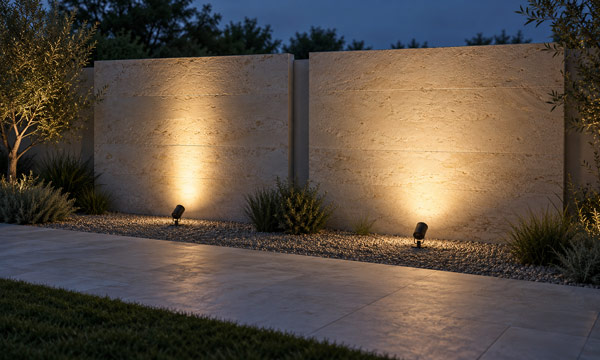
Narrow and wide spotlight beams distribute light differently, with gradual falloff extending beyond the main illuminated areas.
It also does not guarantee that the ground receives half the center illuminance at that boundary. The beam’s outer rays travel farther and strike a horizontal surface more obliquely.
How to Convert Candela Into Illuminance
Candela becomes more useful when you connect it to a particular point on a surface.
For a compact source at a distance where the point-source approximation is appropriate, illuminance on a surface perpendicular to the incoming light can be estimated as:
E = I ÷ r²
Here, E is illuminance in lux, I is intensity in candela toward the point, and r is the distance in meters.
If the intensity is 360 cd:
| Distance | Estimated illuminance |
|---|---|
| 2 m | 90 lx |
| 3 m | 40 lx |
| 6 m | 10 lx |
Doubling the distance reduces illuminance to one-quarter, provided the direction and receiving-surface orientation remain the same.
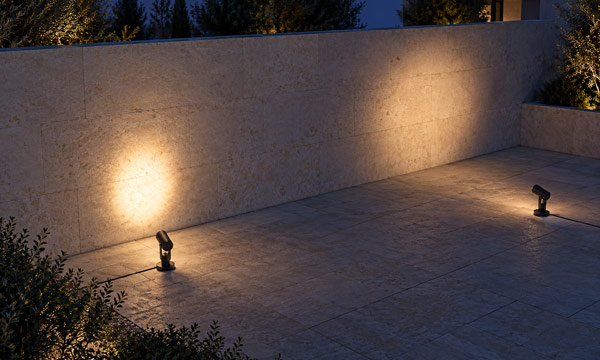
With the same beam angle and light output, increasing the distance between a spotlight and the wall creates a larger light pattern with lower illuminance.
When light strikes the surface at an angle, use:
E = I × cos α ÷ r²
The angle α is measured between the incoming light and a line perpendicular to the receiving surface. The distance r is the actual distance from the fixture to the point, rather than simply the mounting height.
This distinction matters when evaluating a walkway edge or illuminating a wall from below.
A Practical Example: Why Higher Center Intensity Can Leave a Darker Gap
Consider two candidate fixtures for pole-mounted pathway lighting.
Both have the same total lumen output, but their optical distributions differ. Fixture A concentrates more light directly downward. Fixture B directs more light outward.
Assume:
- Mounting height is 3 m above a level path.
- Fixtures are spaced 4 m apart.
- Both fixtures point straight down.
- Their distributions are symmetrical.
- Obstructions and reflected light are excluded.
The midpoint lies 2 m horizontally from each fixture. From either fixture, that point is approximately 33.7° away from straight down, at a slant distance of 3.61 m.
These hypothetical chart readings show the difference:
| Measurement | Fixture A | Fixture B |
|---|---|---|
| Intensity straight down | 600 cd | 400 cd |
| Intensity toward the midpoint, at 33.7° | 120 cd | 200 cd |
| Midpoint illuminance from one fixture | 7.7 lx | 12.8 lx |
| Midpoint illuminance from two adjacent fixtures | 15.4 lx | 25.6 lx |
For Fixture A, the contribution from one fixture is:
120 × cos 33.7° ÷ 3.61² ≈ 7.7 lx
For Fixture B:
200 × cos 33.7° ÷ 3.61² ≈ 12.8 lx
The values are illustrative, rather than recommended pathway lighting levels.
Fixture A has the higher center intensity. Fixture B delivers more light to the gap between fixtures.
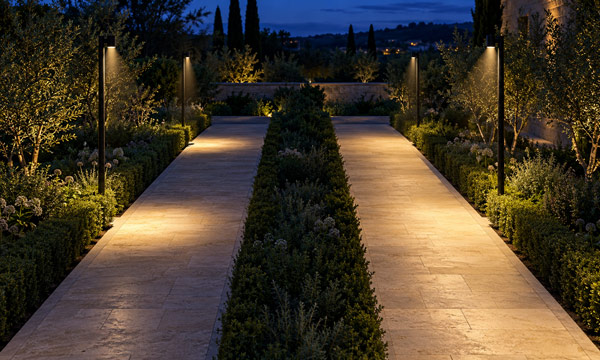
Higher center-beam intensity can create bright pools beneath fixtures, while broader distributions may deliver more useful light between pathway lights.
That comparison suggests a better way to assess a chart: choose the point that matters in the installation, then inspect the intensity directed toward it.
For a walkway, that point may be between fixtures. For a statue, it may be the upper edge of the object. For a wall, it may be the area farthest from the light.
Read the Curve Beyond Its Brightest Point
Examine How Quickly Intensity Falls Away
The peak tells you where intensity is highest. The surrounding curve tells you how quickly it decreases.
A steep falloff can help isolate a narrow feature. A broader distribution may provide more useful overlap across an extended surface.
When comparing LED spike lights for a tree or sculpture, inspect the intensity toward the edges of the subject. A high center reading may illuminate the trunk strongly while leaving the canopy or surrounding form underlit.
A useful comparison therefore includes the center, the target’s outer edges, and any nearby surfaces that should receive little light.
Look Toward Places Where Light Would Be Unwanted
A lighting design also has boundaries: neighboring windows, seating positions, property edges, or the space beyond a garden feature.
Identify the direction from the fixture toward those locations and inspect the corresponding intensity. This gives the chart a practical role in checking spill light.
Be careful with glare conclusions, however. Directional intensity is useful evidence, but visual discomfort also depends on the visible emitting area, viewing position, and background. A polar curve alone cannot establish that a fixture will feel comfortable to look toward.
Check the Surface You Actually Need to Illuminate

Entrance lighting can brighten the walking surface while leaving a visitor’s face in shadow, highlighting the importance of vertical illuminance.
A horizontal illuminance plot answers questions about a horizontal surface. It does not automatically describe illumination on a face, sign, wall, or stair riser.
For an entrance, the ground may receive adequate light while a visitor’s face remains poorly illuminated. For steps, a bright tread does not guarantee that the change in level is visually clear.
Choose the calculation plane to match the task.
Use Isolux Lines to Check Coverage and Overlap
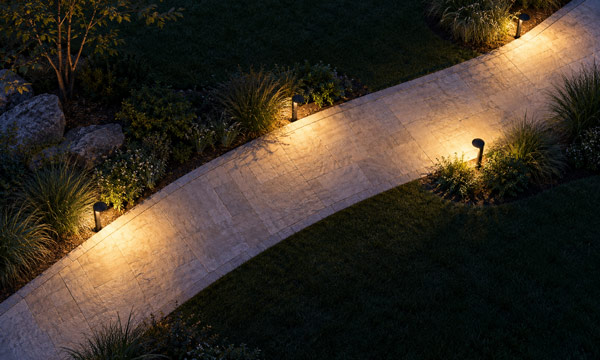
Overlapping light patterns support continuous illumination across the walkway’s width, helping illuminate path edges while keeping surrounding areas relatively dark.
An isolux diagram connects points with equal illuminance at a stated mounting height and orientation.
Before using it, confirm the height, distance units, output setting, and calculation plane. Some diagrams express distances as multiples of mounting height.
For two identical fixtures, illuminance contributions can be added at the same point. If each contributes 2 lx at the midpoint, their combined contribution there is approximately 4 lx.
That does not make the whole path a 4 lx surface. Check the path edges, bends, and positions between neighboring fixtures as well.
The most useful overlap is the overlap that supports the required illumination across the actual walking area.
What to Check Before Finalizing the Layout
Use the chart to answer a short sequence of practical questions:
- Does the report match the installed fixture? Confirm the optic, output setting, and accessories.
- Are the units and orientation clear? Establish what each curve and scale represents.
- Where is the critical point? Identify the location most likely to receive insufficient light.
- What intensity reaches that point? Read the relevant direction rather than relying on peak candela.
- What happens between fixtures and at boundaries? Check combined contributions and unwanted spill.
- Does the calculation represent the intended surface? Match the plane, height, and aiming direction to the installation.
A successful reading ends with a placement decision: whether to change the optic, move the fixture, adjust its aim, or revise the spacing.
FAQs
1. What Is the Difference Between a Photometric Chart and an IES File?
A photometric chart presents selected lighting data visually. An IES file stores angular intensity data in a standardized digital format that lighting calculation software can interpret.
A chart is useful for understanding the distribution. An IES file allows that distribution to be evaluated within a modeled installation containing multiple fixtures, surfaces, and mounting positions. Request the file that corresponds to the selected fixture configuration.
2. What Is a Light Loss Factor in a Photometric Calculation?
A light loss factor, or LLF, allows a calculation to account for operating conditions and reductions in delivered light, including lumen depreciation and dirt accumulation.
For example, applying an illustrative LLF of 0.80 to an initial prediction of 20 lx gives 16 lx. The appropriate factor depends on the equipment, environment, and maintenance assumptions. Check whether a lighting plan reports initial or maintained illuminance before comparing its results.
3. Can 2700K and 3000K Versions Use the Same Photometric Chart?
Use data for the selected version or an equivalent explicitly approved by the manufacturer.
When comparing 2700K and 3000K landscape lighting, similar optics may produce similar distribution shapes while the actual lumen output differs. Similar shapes therefore do not establish identical candela values. Any proposed scaling should use verified output data and confirmation that the distribution remains applicable.
4. What Do Type I, II, III, IV, and V Mean in Outdoor Lighting?
These are distribution classifications used in roadway and area lighting. They describe how light spreads relative to the luminaire’s position, rather than rating its brightness.
Types II and III commonly appear in roadway applications, while Type V is often associated with area lighting around a mounting position. Fixtures within the same classification can still produce different detailed patterns, so the classification should be followed by a review of the actual photometric data.
5. What Is the Difference Between BUG Ratings and UGR?
BUG stands for Backlight, Uplight, and Glare. It classifies outdoor luminaire output in defined angular zones to help evaluate issues such as light trespass, uplight, and high-angle light.
UGR stands for Unified Glare Rating and addresses discomfort glare in interior lighting conditions. The two systems serve different purposes and are not interchangeable. For an outdoor project, evaluate the applicable outdoor criteria together with the fixture’s installed orientation and surrounding conditions.
