

Table of Contents
To reset many standard hardwired motion sensor lights, turn off the power at the wall switch or the correct circuit breaker, leave it off for about 60 seconds, and then turn it back on once. Allow the sensor to finish warming up before testing it. If your instruction manual specifies a different reset sequence or waiting time, follow that procedure.
A reset can help when a motion sensor light stays on, stops responding, or behaves unexpectedly after a power interruption. However, battery-powered, solar, and smart lights may require different steps.
The first thing to establish is whether you need a simple restart, a return to automatic mode, or a factory reset.
Before You Reset the Light
Check a few basic conditions before interrupting the power:
- Power: Confirm that the supplying switch is on and that the light has a working power source.
- Operating mode: Look for AUTO, TEST, ON, or a similar setting. A light in constant-on mode may be working exactly as configured.
- Daylight: A fixture with a daylight sensor may intentionally ignore movement when the surroundings are bright.
- Sensor lens: Remove leaves, cobwebs, and surface dirt that could obstruct detection.
- Bulb: If the fixture uses a replaceable bulb, check that it is working and matches the fixture’s requirements.
A basic power reset should not require opening the light housing or touching wiring. Use accessible controls and identify the correct circuit before operating a breaker.
How to Reset a Hardwired Motion Sensor Light
1. Turn Off the Power
Switch off the wall switch that supplies power to the fixture.
If the light has no power-cutting wall switch, use the clearly identified circuit breaker for that lighting circuit. Either method must actually interrupt power to the light; an app command that only turns off the lamp may leave the sensor powered.
2. Leave the Power Off
For many conventional fixtures, about 60 seconds is a useful starting point. Use the interval stated in your manual when one is provided.
There is no universal reset duration. Different designs use different timing to restart their electronics or exit an operating mode.
3. Restore Power Once
Turn the switch or breaker back on in one deliberate movement.
Avoid repeatedly flicking the wall switch unless your manual specifically requires it. Some motion sensor lights interpret rapid switching as a command to enter manual override, which can leave the light continuously illuminated. Manufacturer instructions confirm that both the override sequence and the method for returning to automatic operation vary by model.
4. Allow the Sensor to Warm Up
Wait for the startup period specified in the instructions. On some conventional fixtures, this takes approximately one minute, and the lamp may illuminate during that time.
Keep movement out of the detection area while the sensor stabilizes. Switching the power again before startup finishes can make the result difficult to assess.
5. Test Automatic Operation
Test after dark, or use the fixture’s designated TEST mode if it supports daytime testing.
Walk across the detection area, then leave it completely. Check that the light:
- Turns on when it detects your movement.
- Remains illuminated for the selected delay.
- Turns off after no further movement is detected.
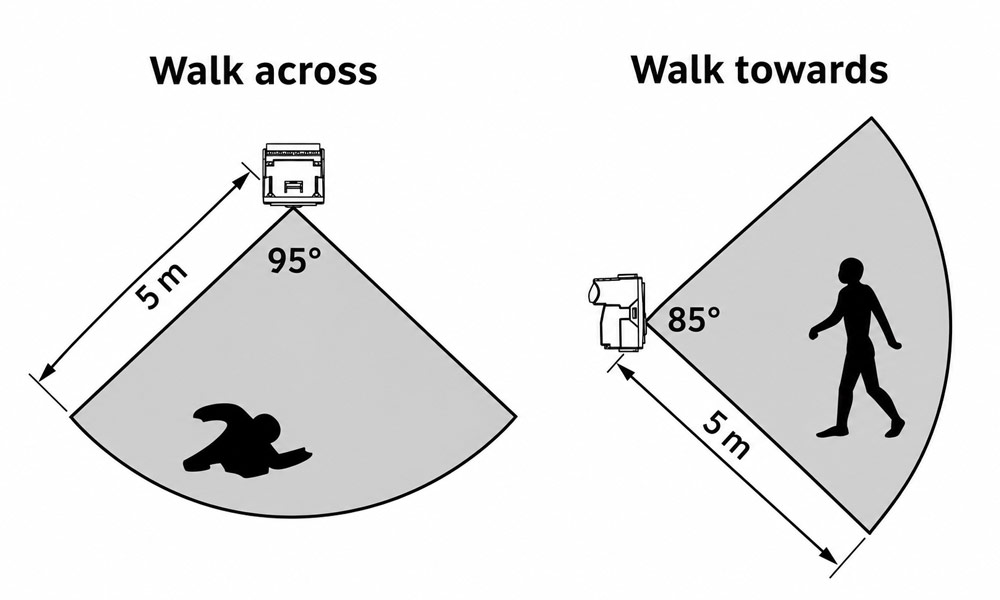
A PIR motion sensor light generally detects movement more reliably when you walk across its sensing zones than directly toward it, making a sideways walking test useful for checking detection after a reset.
Walking across the sensor’s field of view is generally a better test for a PIR sensor than approaching it directly. After testing, return the fixture to its normal automatic setting and leave the supplying switch on.
How to Reset Other Types of Motion Sensor Lights
Battery-Powered Motion Sensor Lights
Start with the light’s accessible power switch or its documented restart procedure.
If the instructions permit battery removal, switch the unit off, remove the user-replaceable batteries, and wait for the specified interval before reinstalling them. Check polarity and use the battery type required by the manufacturer.
Allow any startup or dark-room calibration period to finish before testing.
If the light is dim, operates briefly, or repeatedly restarts, check the batteries before repeating the reset. Restarting the sensor cannot restore depleted battery capacity.
Solar Motion Sensor Lights
When resetting solar lights, check the charging system as well as the motion detector.
Use the approved power switch or reset control, then allow the light to charge under the conditions specified in its manual. Clean the solar panel and check that surrounding objects are not blocking sunlight.
Test after dark once the battery has sufficient charge.
Only remove a battery when the product is designed for user replacement. Keep sealed housings closed and use the documented procedure for that model.
A solar light that responds briefly and then shuts down may have insufficient stored energy. Repeated resets will not correct poor charging or a worn battery.
Smart Motion Sensor Lights
Try the device’s normal restart or reboot function first. Also check whether a schedule, automation, or linked device is overriding motion control.
A factory reset is a separate operation. Depending on the product, it can erase pairing information and require the light to be added to the app again. Use the exact procedure for your model rather than assuming every reset button should be held for the same number of seconds.
Check These Settings After Resetting
A successful restart does not guarantee that the light’s settings suit its location.
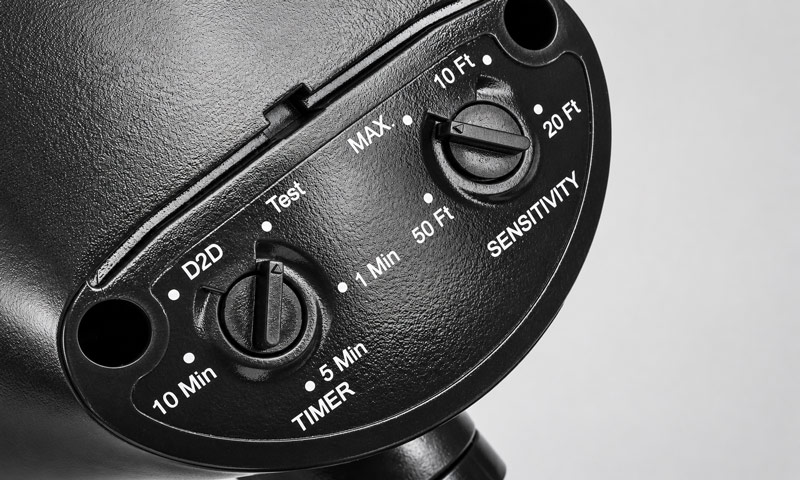
AUTO or Operating Mode
Select the setting intended for automatic motion detection. Labels vary, but AUTO commonly indicates normal sensor-controlled operation.
Leave TEST mode after checking coverage. Some fixtures allow daytime activation and use a very short delay while testing.
TIME or Duration
This setting determines how long the light remains on after the last detected movement.
Choose a short available delay during troubleshooting so you can observe a complete on-and-off cycle. Then select a duration that gives people enough time to use the path, entrance, or driveway.
Continued movement can restart the countdown, making a correctly operating light appear stuck on.
SENS or Detection Range
Start with moderate sensitivity and adjust it gradually.
Excessive coverage may include passing vehicles, animals, or activity outside the intended area. Insufficient coverage can prevent the light from responding where illumination is needed.
Adjust the sensor’s direction as well as its sensitivity.
LUX or Daylight Threshold
The daylight setting determines how dark the surroundings must be before motion can activate the lamp.
If the light works in TEST mode but stays off during normal operation, check the daylight threshold and nearby lighting. A bright porch light or illumination reaching the photocell may prevent activation.
Follow the markings in your manual when adjusting the dial. Control layouts and symbols differ between products.
What If the Motion Sensor Light Still Does Not Work?
Use the remaining symptom to choose the next check.
| Symptom | What to check next |
|---|---|
| The light stays on continuously | Confirm automatic mode, check the selected duration, and look for repeated movement within the detection area. |
| The light never turns on | Check the power supply, replaceable bulb, battery condition, daylight threshold, and sensor direction. |
| The light activates without an obvious reason | Reduce unnecessary coverage and look for passing traffic, animals, or nearby heat sources. |
| The light repeatedly switches on and off | Check whether its own illumination is affecting the daylight sensor and whether the sensor or lamp needs repositioning. |
| Flickering lights continue after restarting | Check component compatibility and have persistent power, connection, or driver problems assessed. |
| A solar light works only briefly | Check sunlight exposure, panel cleanliness, and rechargeable battery condition. |
Change one setting at a time, then repeat the same walking test. This makes it easier to identify which adjustment improves operation.
Once you have completed the documented reset and checked the relevant settings, repeating the same sequence is unlikely to resolve an underlying hardware fault.
When Should You Repair or Replace the Light?
Arrange professional assessment if the fixture has damaged wiring, water inside the electrical housing, a burning smell, or repeated circuit-breaker trips. Leave the affected circuit off when an electrical fault is suspected.
A failed sensor, switching component, or LED driver may require repair or replacement. For fixtures with replaceable parts, confirm compatibility before purchasing a replacement. For sealed integrated lights, check the warranty and service options before replacing the entire unit.
FAQs
1. Can a Motion Sensor Light Detect Movement Through Glass?
A standard PIR motion sensor generally cannot detect a person through ordinary window glass because the glass blocks the infrared radiation used for detection. Some radar sensors can detect movement through certain materials, so the result depends on the technology.
The differences between PIR and radar sensors matter when positioning a light near windows or other barriers. Resetting a PIR sensor will not overcome this limitation.
2. Why Does My Motion Sensor Light Turn Off When I Stand Still?
A conventional PIR sensor responds to changes in infrared radiation as a warm object moves through its detection zones. If you remain still, it may stop detecting movement and let the timer expire.
Increasing the delay can help with brief pauses. For areas where people sit or remain relatively motionless, a sensor designed for presence detection may be more suitable.
3. Can You Use a Dimmer Switch With a Motion Sensor Light?
Only when the complete lighting system is explicitly compatible with dimming. The fixture, sensor or controller, bulb or LED driver, and dimmer must work together.
Installing a dimmable bulb does not make an otherwise incompatible motion sensor fixture dimmable. Many conventional outdoor sensor lights require a standard on/off switch, so check the product instructions before changing the control.
4. Do Motion Sensor Lights Need Wi-Fi?
Conventional standalone motion sensor lights operate through their onboard sensor and controller and generally do not need Wi-Fi.
Smart models vary. Network access may be necessary for app controls, remote access, or particular automations, while local motion detection may continue independently. Check the model’s offline behavior before treating a connection problem as a sensor failure.
5. Do Motion Sensor Lights Use Electricity When the Lamp Is Off?
Usually, yes, if the sensor remains powered and ready to detect movement. The lamp can be dark while the sensing electronics consume a small amount of standby power.
Actual consumption depends on the fixture. Battery and solar models draw this energy from their stored charge. For a hardwired light, switching off the supply completely also prevents automatic motion detection until power is restored.
