

Table of Contents
- What Are IoT Smart Lighting Solutions?
- What Components Make Up an IoT Smart Lighting System?
- How Do IoT Smart Lighting Solutions Work?
- How Do Smart Lighting Devices Connect?
- What Are the Benefits of IoT Smart Lighting?
- How Much Energy Can IoT Lighting Save?
- Where Are IoT Smart Lighting Solutions Used?
- How to Choose an IoT Smart Lighting Solution
- FAQs
IoT smart lighting solutions combine connected lights, sensors, controllers, and software to automate illumination and exchange operating data. They allow lighting to respond to schedules, occupancy, and available daylight while giving users control over individual fixtures or groups of lights.
For a homeowner, this might mean pathway lighting that responds to evening activity. For a property manager, it could mean controlling hundreds of fixtures, reviewing electricity consumption, and identifying equipment that needs attention.
Understanding how these systems work starts with the relationship between the lighting hardware, the communication network, and the rules that guide their operation.
What Are IoT Smart Lighting Solutions?
The Internet of Things, or IoT, describes physical devices that communicate through a digital network. In a lighting system, these devices can include LED luminaires, occupancy sensors, light sensors, and lighting controllers.
A connected lighting system collects information about its surroundings and operating conditions, then uses that information to support lighting decisions. Depending on its capabilities, it can adjust brightness, activate a lighting scene, record energy use, or report an abnormal condition.
A complete solution can include several functions:
- Switching lights individually or in groups.
- Adjusting brightness through compatible drivers.
- Running schedules and sensor-based routines.
- Changing color or white-light temperature where supported.
- Monitoring equipment status and energy consumption.
- Managing lighting across multiple areas.
These capabilities depend on the equipment selected. A connected bulb may provide app control and dimming, while a larger installation may include metering, diagnostics, and a central management platform.
How Does IoT Lighting Differ From Other Lighting Systems?
| Lighting system | Typical operation | Management capabilities |
|---|---|---|
| Conventional LED lighting | Operates through a switch or basic electrical control | Limited visibility into individual fixtures |
| Standalone automatic lighting | Responds to a local timer, photocell, or occupancy sensor | Controls the directly connected lighting |
| IoT smart lighting | Exchanges commands and operating information through a network | Supports coordinated control and, where equipped, centralized monitoring |
A standalone motion-activated light can operate automatically without being part of an IoT system. Network communication enables connected lighting to coordinate devices and make operating information available beyond the immediate lighting circuit.
What Components Make Up an IoT Smart Lighting System?
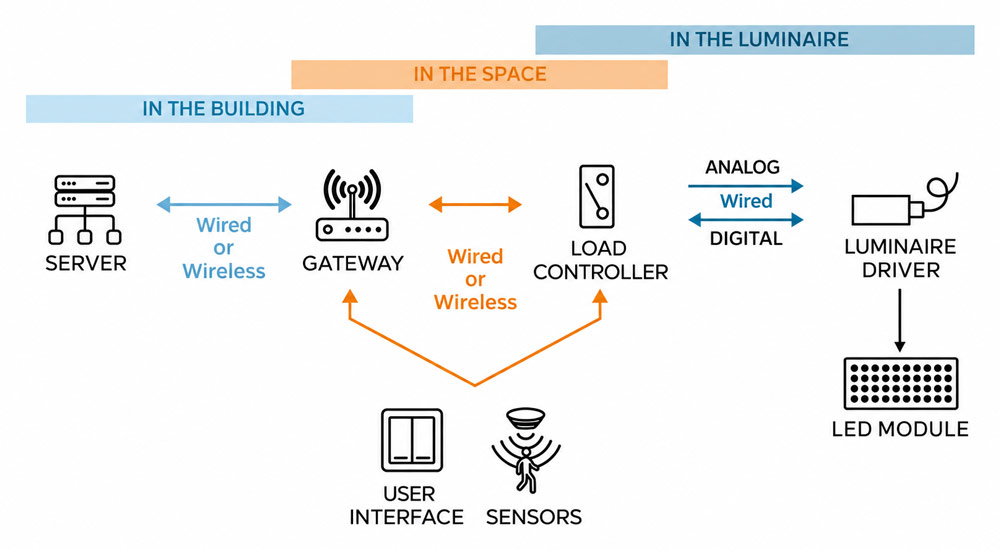
The main components perform different jobs, although several may be integrated into the same device.
| Component | Main function |
|---|---|
| LED fixture and driver | Produce light and implement supported brightness or color adjustments |
| Sensors | Detect conditions such as occupancy and available daylight |
| Lighting controller | Apply control rules and send commands to the lighting equipment |
| Communication network | Carry commands and operating information between devices |
| Management software | Configure schedules, organize lighting groups, and display available data |
Some architectures also use a gateway to connect the lighting network with a server or another network. A gateway may translate communication protocols and provide a route for centralized management. Its location matters in wireless installations because surrounding structures and distance affect signal strength.
The capabilities of the complete system depend on every part of this chain. Software cannot obtain accurate energy measurements from a fixture that has no suitable metering hardware, and a controller cannot provide dimming through a driver that only supports switching.
How Do IoT Smart Lighting Solutions Work?
An IoT lighting system follows a repeating process: collect information, communicate it, apply a rule, adjust the light, and report the available results.
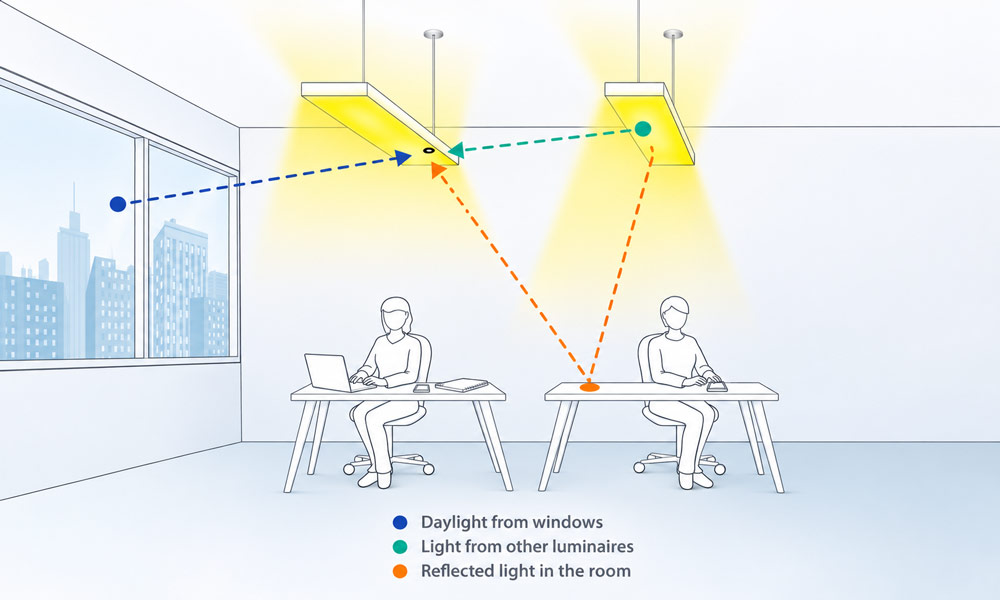
Smart lighting sensors detect and measure three key light components in the workspace: natural daylight entering through windows (blue), illumination from other luminaires (green), and reflected light within the room (orange), providing real-time ambient light data for intelligent lighting control.
1. Sensors Collect Information
Sensors provide information that helps the system determine when lighting is needed.
An occupancy sensor detects activity or presence within its coverage area. A daylight sensor measures available light so electric lighting can respond appropriately.
Indoors, daylight-responsive control can reduce electric light output when sufficient daylight is available. Occupancy control can adjust lighting when a space becomes occupied or vacant. Sensor placement and configuration affect how reliably these strategies work.
2. Devices Exchange Data
Sensor readings and user commands travel through a wired or wireless network.
Depending on the architecture, information may move directly between nearby devices, pass through a controller, or reach a management platform through a gateway.
The required communication pattern depends on the application. A small courtyard might use a few coordinated lighting zones, while a large property may need multiple controllers and a central overview.
3. Control Rules Determine the Response
The system evaluates the information against its configured rules.
For example, a courtyard lighting plan might specify that:
- Entrance lighting activates after sunset.
- Decorative lighting follows the property’s evening schedule.
- Activity near a pathway temporarily increases its illumination.
- Lighting returns to its configured background level after the area becomes vacant.
The rules should define what happens when several conditions occur together. A manual command, an occupancy event, and a scheduled change should have a clear order of priority.
4. Controllers Adjust the Lighting
Controllers send commands to compatible drivers or switching devices.
The resulting action might be a change in brightness, an on/off command, or a transition to a predefined scene. Color and white-light temperature adjustments require fixtures designed for those functions.
Smooth transitions and suitable occupancy delays help the lighting behave consistently during everyday use.
5. The System Reports Operating Information
Where supported, connected equipment sends status information back to the management software.
This may include operating hours, communication status, electrical measurements, and fault indications. The available information depends on the controller, driver, sensors, and reporting configuration.
A command acknowledgment confirms that a command was received. It does not independently verify that the required light level has been achieved on the ground. Physical lighting measurements remain useful during commissioning, and energy-reporting accuracy should also be checked.
How Do Smart Lighting Devices Connect?
IoT smart lighting solutions can use several networking approaches. The appropriate choice depends on the site layout, device count, response requirements, and available infrastructure.
| Networking approach | Typical application | Main consideration |
|---|---|---|
| Access-point-based wireless networking | Homes and smaller connected areas | Reliable coverage at every device location |
| Wireless mesh networking | Groups of distributed lights and sensors | Suitable node placement and network configuration |
| Low-power wide-area networking | Dispersed outdoor assets | Message capacity, reporting intervals, and command response |
| Cellular connectivity | Remote locations or geographically separated installations | Coverage, service charges, and power requirements |
| Wired networking or control | Buildings and planned installations with suitable cabling | Installation access and compatibility between interfaces |
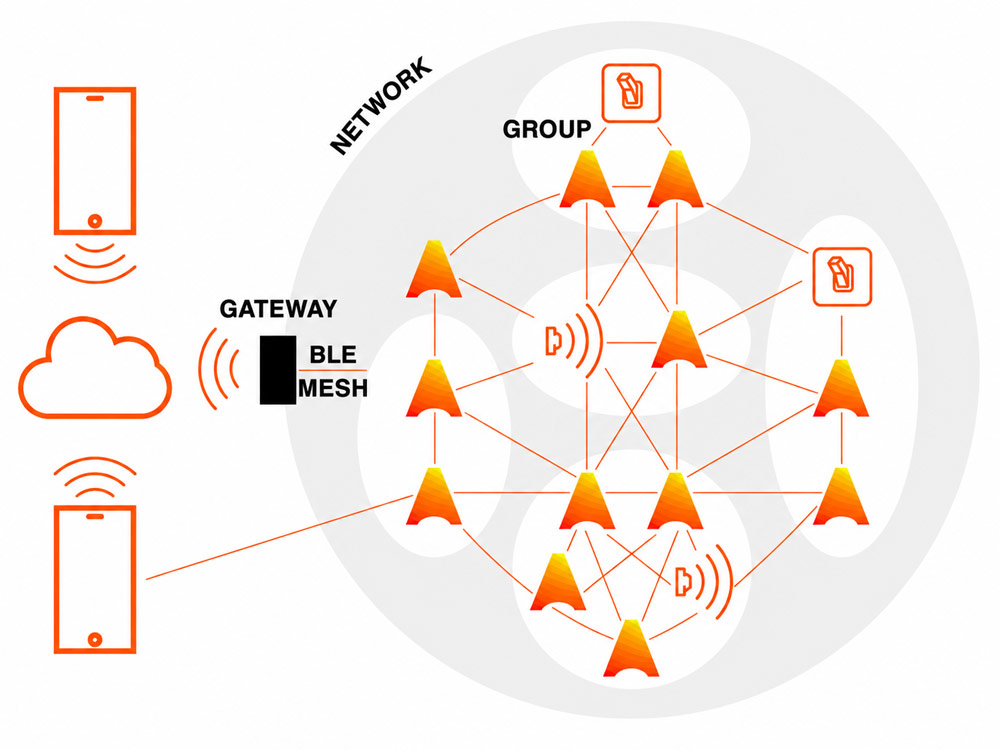
A wireless lighting mesh network connects luminaires and controls, allowing devices to exchange commands and operate in coordinated groups.
Wireless mesh networks support the exchange of small control and monitoring messages among many devices. Wide-area networks support distributed applications such as streetlighting, where devices may be spread across a much larger area.
The network connection and the driver’s control interface serve different purposes. A wireless controller may still use a wired interface to adjust the LED driver.
Sharing a communication technology also does not guarantee that every device supports the same features. Compatibility should be verified across the complete control system.
What Are the Benefits of IoT Smart Lighting?
More Precise Energy Use
Connected controls create opportunities to reduce unnecessary lighting through scheduling, occupancy response, daylight adjustment, and suitable brightness settings.
The benefit comes from changing how lighting operates. Connecting a fixture to a network does not automatically reduce its electricity consumption.
Savings also depend on the starting point. Replacing an inefficient light source with an LED produces one type of improvement. Adding controls to an existing LED installation produces an additional, separate improvement. Lighting-control strategies should be evaluated against the actual baseline.
Easier Management of Multiple Lighting Areas
Centralized management allows users to organize fixtures by room, pathway, building, or operating purpose.
A property manager can update an evening schedule for a group of lights without adjusting every device individually. Separating decorative, circulation, and entrance lighting also makes it easier to apply appropriate settings to each area.
Faster Identification of Operating Problems
Connected monitoring can help identify lights that remain on during the day, fail to respond, or stop communicating.
Useful alerts allow maintenance teams to prioritize investigations and arrive with more information about the affected location.
An alert still requires interpretation. A communication failure may involve the network or controller rather than the light source itself.
More Flexible Lighting Scenes
Compatible systems allow users to create different lighting settings for everyday routines and activities.
A patio might have separate scenes for dining and evening relaxation. A commercial space might use different settings for normal operation, cleaning, and closing.
Scene control becomes more useful when the available settings reflect how people actually use the space.
How Much Energy Can IoT Lighting Save?
There is no single savings percentage that applies to every installation. Operating hours, existing controls, occupancy patterns, and required illumination all affect the outcome.
A simple example shows how to evaluate a proposed change.
Suppose 40 LED fixtures each draw 12 watts and operate for 10 hours per day:
Annual fixture energy use = 40 × 12 × 10 × 365 ÷ 1,000 = 1,752 kWh
If a proposed control schedule reduces average fixture power during those hours to 7.5 watts:
Annual fixture energy use = 40 × 7.5 × 10 × 365 ÷ 1,000 = 1,095 kWh
The illustrative reduction is 657 kWh per year for the fixtures.
This calculation uses assumed operating conditions. A project assessment should also include controller consumption, gateways, standby power, and actual usage patterns.
Financial evaluation should consider installation, commissioning, software subscriptions, communication charges, maintenance, and future replacement costs. Measured results from a pilot installation provide a stronger basis for a larger rollout than a general savings claim.
Where Are IoT Smart Lighting Solutions Used?
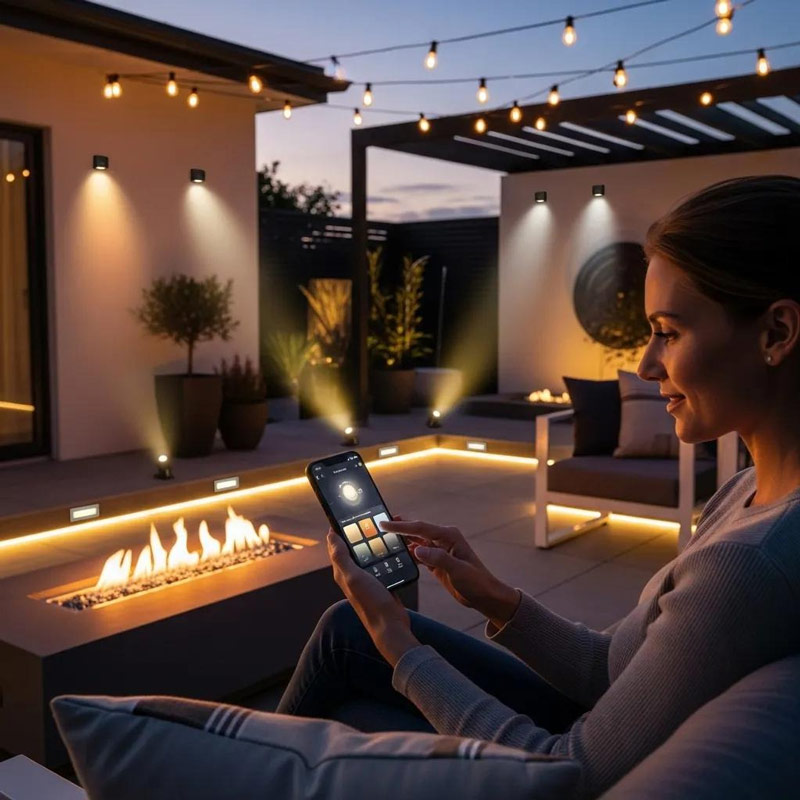
Homes, Gardens, and Outdoor Living Areas
Residential systems can coordinate entrances, patios, pathways, and decorative lighting.
In smart landscape lighting, separate zones allow different parts of the garden to follow different schedules. Decorative lights can finish their evening cycle while necessary circulation lighting continues operating.
This approach gives homeowners control over the appearance and practical use of the outdoor space.
Commercial and Industrial Properties
Offices, warehouses, hospitality properties, and shared facilities can use connected controls to match lighting with changing activity.
Separate zones help avoid applying one operating schedule to spaces with different needs. A meeting room, storage area, and continuously used corridor may each require a different control strategy.
Streets, Parking Areas, and Campuses
Distributed outdoor installations benefit from managing lighting groups and reviewing equipment status centrally.
The design should account for actual visibility requirements, uniformity, and the activities taking place in each area. Dimming settings should be established through an appropriate lighting assessment.
How to Choose an IoT Smart Lighting Solution
Define the Required Functions
Start with the problems the installation needs to solve.
A small property may need convenient scheduling and scene control. A larger installation may require individual fixture monitoring, energy reporting, and management across several locations.
A clear functional brief makes it easier to distinguish essential capabilities from optional features.
Evaluate Lighting Quality
Assess brightness, beam distribution, glare, color quality, and fixture placement alongside the control features.
A connected fixture still needs to illuminate the intended surface effectively. The control system should support the lighting design and the activities taking place in the space.
Check the Installation Environment
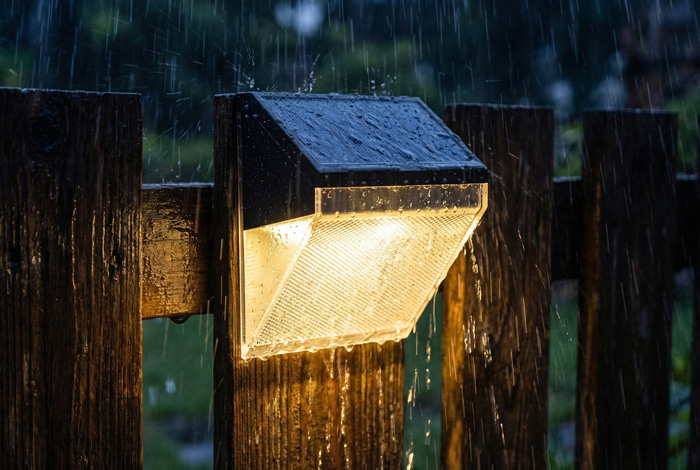
Outdoor lights, controllers, and connections need protection appropriate to their exposure.
Understanding outdoor ingress protection ratings helps distinguish equipment intended for different dust and water conditions.
Also assess temperature, corrosion exposure, drainage, and installation quality. An enclosure rating addresses specific forms of ingress and does not describe every aspect of outdoor durability.
Test Network Coverage on Site
Check communication at the actual installation positions.
Walls, metal structures, equipment, and vegetation can affect wireless performance. Test the most difficult locations and verify that the system can support the planned device count.
Verify What the Software Measures
Ask whether reported energy use is measured directly or estimated from configured operating conditions.
Also confirm reporting intervals, historical data access, alert behavior, and the ability to export useful records.
These details affect how confidently the information can support operational decisions.
Commission a Representative Pilot
Begin with an area that includes typical fixtures, challenging communication locations, and realistic activity patterns.
Verify device identification, lighting groups, schedules, sensor coverage, response times, and manual controls. Record the final settings so they can be maintained consistently as the installation expands.
FAQs
1. Do IoT Smart Lights Still Work Without an Internet Connection?
They can, provided the required functions are stored and executed locally. Some controllers and gateways can continue running schedules and local automation without internet access.
Cloud dashboards, off-site commands, and remote notifications may become unavailable during an outage. Confirm which functions depend on an external connection and test the expected behavior before relying on the system.
2. Can Existing LED Lights Be Upgraded to IoT Smart Lighting?
Often, but the available functions depend on the existing equipment. A compatible connected controller may add switching, while dimming requires a suitable driver and matching control interface.
Some installations need replacement drivers, additional wiring, or new fixtures to achieve the intended capabilities. Have the complete arrangement assessed, including any transformers and switching equipment, before selecting retrofit components.
3. How Can IoT Smart Lighting Data Be Protected?
Look for controlled device access, protection of stored and transmitted data, secure configuration, and a supported software-update process.
Fagan, M., Megas, K. N., Scarfone, K., & Smith, M. (2020). IoT device cybersecurity capability core baseline (NISTIR 8259A). National Institute of Standards and Technology.
For managed installations, identify who can change lighting settings and who maintains the devices over time. Also establish what data is collected and how long it is retained. Security depends on the product’s capabilities and its ongoing configuration and maintenance.
4. Can Solar-Powered Lights Be Part of an IoT Lighting System?
Yes. Solar lighting designed with compatible communication and control equipment can support remote monitoring, individual or group commands, and changes to dimming profiles. Some systems also report battery and charging conditions.
Solar power alone does not make a light connected. When specifying the system, include communication equipment in the energy budget and assess operation during periods of limited sunlight.
5. Why Do Smart LED Lights Flicker When Dimmed?
Flickering can result from the interaction between the LED driver and the dimming method, especially when the equipment operates outside its supported range. Driver design and compatibility affect how steadily the LEDs produce light.
U.S. Department of Energy. (n.d.). Flicker basics.
Where an existing wall control is involved, dimmer incompatibility is one possible cause. Check the approved equipment combination and supported minimum brightness. Persistent flickering or suspected electrical faults should be assessed by a qualified electrician.
