

1. Understanding the Role of the Gateway
2. Requirements for Multiple Lights
3. Distance Requirements
4. Placement for Stable Coverage
5. Permanence of Installation
6. Power Requirements
7. Network Requirements
8. Environmental Requirements
9. Interference Considerations
10. Gateway Quantity and Zoning
11. Installation Testing
12. Maintenance Access
13. Common Installation Mistakes
14. Recommended Installation Approach
FAQs
A gateway is the central communication point that connects multiple lights to a control system, network, or automation platform. Whether the installation is for a residential smart lighting system, a commercial building, an industrial space, or an outdoor lighting network, the gateway must be installed with careful attention to device quantity, communication distance, physical placement, power stability, and long-term permanence. A poorly installed gateway can lead to weak signal coverage, delayed responses, unstable connections, inconsistent lighting control, and expensive future maintenance.
For any lighting system that depends on a gateway, installation should not be treated as a simple plug-in task. It is a foundational step that determines how reliably the entire lighting network will operate.
1. Understanding the Role of the Gateway

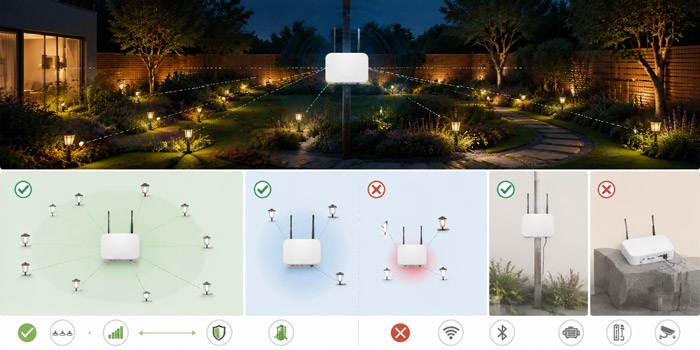
The gateway acts as the bridge between lights and the control environment. In many systems, lights communicate with the gateway through wireless protocols, wired connections, or a hybrid structure. The gateway then connects to a local network, cloud platform, mobile application, building management system, or centralized control panel.
Its main responsibilities include receiving commands, transmitting instructions, collecting status data, synchronizing multiple lights, and maintaining communication stability. Because many lights may depend on one gateway, its installation location and operating condition directly affect the performance of the whole lighting system.
When multiple lights are involved, the gateway must be positioned and configured to support not only initial connection but also long-term operation under real-world conditions.
2. Requirements for Multiple Lights

When one gateway controls multiple lights, the first requirement is capacity. Every gateway has a maximum number of supported devices. This limit should not be ignored or treated as flexible. Even when a gateway can technically connect to many lights, operating too close to its maximum capacity may reduce responsiveness and stability.
A good installation plan should consider the number of lights currently required and the possibility of future expansion. For example, if a space currently has 40 lights but may expand to 60 or 80 in the future, the gateway capacity should be selected accordingly. Installing a gateway that only barely meets the present requirement may create unnecessary replacement work later.
The lighting layout also matters. Multiple lights spread across several rooms, floors, corridors, or outdoor zones may require more than one gateway. In large installations, dividing lights into zones can improve reliability. Each gateway can serve a defined area, reducing communication load and making troubleshooting easier.
For multiple-light installations, the following factors are especially important:
The gateway should support the total number of lights without performance degradation. Lights should be grouped logically based on physical location and control requirements. Critical lighting areas should not depend on weak or unstable communication paths. Future additions should be considered before final installation. The system should be tested under full load, not only with one or two sample lights.
A common mistake is testing the gateway with only a few lights and assuming the full system will perform the same way. In reality, when many lights are connected, traffic increases, response timing becomes more important, and signal congestion may appear. Full-system testing is necessary before the installation is considered complete.
Distance is one of the most important gateway installation factors. The gateway must be placed close enough to the lights to maintain stable communication, but not so close to interference sources that signal quality is reduced.
In wireless systems, effective distance depends on the communication protocol, building materials, antenna design, interference level, and line-of-sight conditions. A gateway may perform well in an open space but poorly when walls, metal structures, concrete columns, glass partitions, electrical cabinets, or machinery stand between it and the lights.
The stated maximum range from a manufacturer is usually measured under ideal conditions. Real installation environments are rarely ideal. For this reason, installers should not rely only on theoretical range. They should test actual signal strength at the intended location.
Distance planning should include horizontal and vertical coverage. In multi-floor buildings, vertical distance can be more challenging than expected because floors often contain reinforced concrete, steel beams, plumbing, electrical conduits, and other materials that weaken signals. A gateway placed on one floor may not reliably control lights on another floor unless the system is designed for that purpose.
For long corridors, warehouses, parking areas, or outdoor pathways, a single gateway placed at one end may create uneven coverage. Lights near the gateway may respond quickly, while distant lights may respond slowly or disconnect. A better approach is to place the gateway near the center of the lighting group or divide the area into multiple communication zones.
See also: Dhere, P., Chilveri, P., Vatti, R., Iyer, V., & Jagdale, K. (2018). Analysis of the impact of building materials on ISM 2.4GHz band. 2018 International Conference on Current Trends towards Converging Technologies (ICCTCT), 1–4.
4. Placement for Stable Coverage

The gateway should be installed in a location that provides balanced coverage to all associated lights. Central placement is usually preferred, especially when the lights are distributed evenly around the area. However, central placement is not always possible because of power access, network access, physical protection, or building layout.
The installer should avoid placing the gateway inside metal enclosures unless the product is specifically designed for that environment. Metal can block or reflect wireless signals, causing unreliable communication. The gateway should also be kept away from large motors, transformers, high-voltage equipment, thick concrete barriers, and dense cable trays.
Height can also influence performance. Installing the gateway too low may expose it to obstructions such as furniture, storage racks, vehicles, partitions, or people. Installing it at a moderate height, such as on a wall or ceiling area, can improve signal distribution. However, it must still remain accessible for maintenance, inspection, replacement, or reset procedures.
The best placement is not simply the most convenient location. It is the location that provides stable communication, safe mounting, reliable power, and long-term serviceability.
Permanence means the gateway should be installed as a stable, fixed part of the lighting system, not placed loosely in a temporary or vulnerable location. A gateway left on a desk, shelf, ceiling tile, or unsecured surface may be moved, unplugged, damaged, or affected by environmental changes.
For a permanent lighting installation, the gateway should be securely mounted. The mounting surface must be strong enough to hold the device over time. Cables should be organized and protected. Power connections should not be exposed to accidental disconnection. Network connections should be stable and clearly labeled.
A permanent installation also requires documentation. The gateway location, connected lighting zones, power source, network information, device identification, and maintenance instructions should be recorded. Without documentation, future service work becomes slower and more difficult.
Permanence does not mean the gateway can never be replaced. It means the gateway is installed in a deliberate, protected, and professional manner suitable for long-term operation.

A gateway requires stable power. Even brief power interruptions can disrupt lighting control, disconnect devices, or cause temporary system failure. In critical environments, such as commercial buildings, hospitals, factories, public areas, or security-related lighting zones, gateway power stability is especially important.
The power supply should match the gateway’s rated requirements. Using an incorrect adapter, unstable outlet, overloaded circuit, or poor-quality extension cable may cause failure. For permanent installations, the power connection should be protected from accidental removal.
Where lighting control is essential, backup power should be considered. A gateway connected to an uninterruptible power supply can continue operating during short power outages, allowing lighting control and system communication to remain available.
Power cables should be routed cleanly and safely. They should not hang loosely, cross walking areas, or share space with equipment that may cause damage. Cable management is part of installation quality, not an optional detail.

Many gateways require Ethernet, Wi-Fi, cellular, or another network connection. Network reliability is just as important as lighting communication reliability. A gateway that communicates well with lights but frequently loses internet or local network access will still create control problems.
For fixed installations, wired Ethernet is often preferred when available because it provides greater stability than Wi-Fi. If Wi-Fi is used, the gateway should be within strong signal range of the router or access point. The Wi-Fi network should not be overloaded, unstable, or subject to frequent password or configuration changes.
The network should also be protected. Unauthorized access to a gateway can create security risks, especially in commercial or public lighting systems. Strong passwords, proper network segmentation, firmware updates, and controlled access permissions should be part of the installation plan.
A gateway should not be connected casually to any available network without considering security, reliability, and long-term management.
The installation environment must be suitable for the gateway. Indoor gateways should not be installed outdoors unless they are specifically rated for outdoor use. Temperature, humidity, dust, vibration, water exposure, and sunlight can all affect device life.
In industrial or outdoor environments, the gateway may require a protective enclosure. The enclosure must protect the device without blocking communication signals. Ventilation may also be necessary to prevent overheating.
Environmental requirements should be checked before installation, not after problems occur. A gateway installed in a hot ceiling space, damp utility room, dusty warehouse corner, or exposed outdoor wall may fail prematurely.
For permanent operation, the gateway environment should remain within the product’s rated operating conditions throughout the year.
9. Interference Considerations

Lighting gateways often operate in environments with many electronic devices. Interference can come from Wi-Fi routers, Bluetooth devices, microwave equipment, motors, power supplies, metal structures, security systems, and other wireless networks.
Interference may not always cause complete failure. It may appear as delayed commands, occasional disconnections, uneven dimming response, missed schedules, or inconsistent group control. These problems can be difficult to diagnose if interference was not considered during installation.
A professional installation should include signal testing at different times and under normal operating conditions. For example, a warehouse may have different interference patterns when machinery is running. An office may have heavier wireless traffic during working hours than during installation testing.
The gateway should be placed where interference is minimized and communication paths to the lights are as clear as possible.
See also: Eltholth, A. A. (2023). Improved spectrum coexistence in 2.4 GHz ISM band using optimized chaotic frequency hopping for Wi-Fi and Bluetooth signals. Sensors, 23(11), 5183.
10. Gateway Quantity and Zoning
One gateway is not always enough. The correct number of gateways depends on the number of lights, distance, building structure, control requirements, and reliability expectations.
For small spaces, one gateway may be sufficient. For large buildings or complex layouts, multiple gateways may be required. Each gateway should serve a defined zone. This improves performance and makes system management easier.
Zoning also helps with failure isolation. If one gateway fails, only the lights in that zone are affected rather than the entire building. In critical installations, this can be an important design advantage.
Zones should be planned logically. A zone may be based on room, floor, department, corridor, outdoor area, or functional lighting group. Poor zoning can make control confusing and maintenance inefficient.
Testing is essential before final approval. The gateway should be tested with all intended lights connected. Basic testing should include pairing, command response, dimming control, switching control, scheduling, group control, scene activation, and status feedback.
Distance testing should confirm that the farthest lights respond reliably. Multiple-light testing should confirm that commands sent to groups are executed consistently. Network testing should confirm stable gateway access through the required control interface.
Testing should not be limited to ideal conditions. Doors should be closed, normal equipment should be running, and the environment should match real usage as closely as possible. This helps reveal problems before the system is handed over.
A complete installation test should answer three questions: Can every light communicate with the gateway? Can the gateway operate reliably under normal load? Can the system remain stable over time?
Even a permanent gateway installation must remain accessible. Devices may need firmware updates, inspection, reset, replacement, or network reconfiguration. Installing the gateway behind sealed panels, above inaccessible ceilings, inside locked areas without documentation, or in unsafe locations can create future maintenance problems.
Accessibility should be balanced with protection. The gateway should not be easy for unauthorized people to tamper with, but authorized personnel should be able to reach it when needed.
Labels are useful. A clear label can identify the gateway, its lighting zone, power source, and network connection. This simple step can save significant time during troubleshooting.
13. Common Installation Mistakes
Several problems frequently appear in gateway installations.
One common mistake is placing the gateway wherever power is easiest, without considering distance or coverage. Another is assuming the manufacturer’s maximum range applies to all environments. A third is connecting too many lights to one gateway, creating unstable performance. Temporary placement is also common, especially during early setup, but temporary placement often becomes permanent without proper mounting or documentation.
Other mistakes include hiding the gateway in a metal cabinet, installing it too close to interference sources, ignoring future expansion, failing to test all lights, and leaving cables exposed or unlabeled.
These mistakes are avoidable when installation is planned around multiple lights, distance, and permanence from the beginning.
14. Recommended Installation Approach
A reliable gateway installation should follow a structured approach.
First, identify the total number of lights and their physical locations. Second, confirm the gateway’s supported capacity and communication range. Third, review the building layout and identify walls, floors, metal barriers, and possible interference sources. Fourth, choose a gateway location that provides balanced coverage and stable access to power and network connections. Fifth, mount the gateway permanently and protect all cables. Sixth, connect and test all lights under normal operating conditions. Finally, document the installation for future maintenance.
This approach reduces guesswork and creates a more dependable lighting system.
What protocol is best for gateway-based lighting control?
The best protocol depends on the project size, response speed, compatibility, and control method.
Common options include Zigbee, Bluetooth Mesh, Wi-Fi, LoRa, DALI, and proprietary RF systems.
Can one lighting gateway work with products from different brands?
Cross-brand compatibility depends on whether the gateway and lights use the same protocol, certification standard, and control platform.
Always verify compatibility before purchasing or commissioning.
How can gateway firmware affect lighting system performance?
Firmware influences device compatibility, security, communication stability, bug fixes, and feature support.
Keeping gateway firmware properly updated helps reduce system errors and control failures.
What data does a lighting gateway collect from connected lights?
Depending on the system, a gateway may collect device status, operating time, energy usage, fault alerts, dimming levels, sensor activity, and connection records for monitoring and management.
Is a cloud connection required for a lighting gateway to operate?
Some gateways require cloud access for remote control and advanced automation, while others support local control.
Local-capable gateways are often preferred where internet outages cannot interrupt lighting control.